
The Newsfeed is one of the most-used features in the Doximity iOS app. It is the first thing many users see when they open the app. For doctors checking in between patients or residents catching up during a break, it has to be fast and efficient.
Those expectations defined success for the migration. Feature work had to continue, analytics had to remain reliable, and the experience had to remain familiar to users even as the underlying implementation changed.
We approached the migration less like a rewrite and more like a controlled rollout. We moved one section at a time, kept the UIKit and SwiftUI implementations compatible, measured behavior continuously, and made each step reversible. The technical bridge enabled the migration, but this incremental approach reduced the risk to the product.
The Newsfeed brings several types of content together in a single scrolling experience. Here are a few examples of the different cards users may encounter:
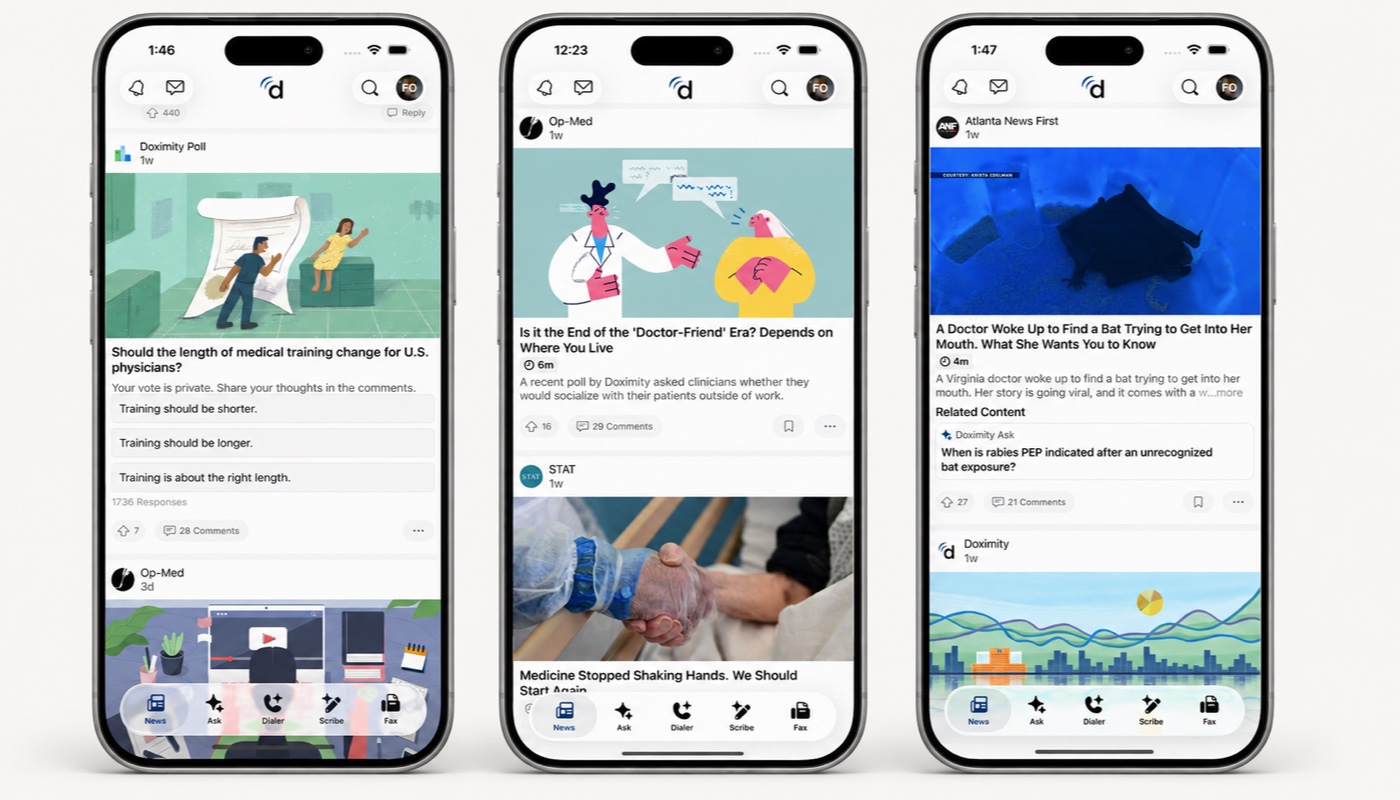
The Architecture Behind the Newsfeed
Before discussing the migration, it helps to understand the architecture that made our incremental approach possible. The Newsfeed is not one large custom view. It is a server-driven list built from cards, with each card assembled from smaller sections.
The server controls the composition of the feed. It tells the app which cards should appear, which sections belong inside each card, and the order in which those sections should render. The iOS app owns the rendering and behavior of each known section type.
This separation makes the feed flexible. Rather than relying on a fixed set of hardcoded card types, the server can compose cards from reusable sections such as headlines, authors, summaries, media, polls, and social actions. By combining and ordering those sections differently, the server can create different card layouts without requiring a new implementation in the app.
This is roughly what the model looks like:
Server-driven feed response

Newsfeed
├─ Card
│  ├─ Section: author
│  ├─ Section: headline
│  ├─ Section: summary
│  ├─ Section: media
│  └─ Section: actions
│
├─ Card
│  ├─ Section: author
│  ├─ Section: summary
│  ├─ Section: poll
│  └─ Section: actions
│
└─ Card
   ├─ Section: author
   ├─ Section: media
   └─ Section: summary
On the iOS side, that server model becomes state for cards and sections, managed with The Composable Architecture (TCA). In TCA, state and logic live in reducers rather than views, so each section type maps to a reducer that owns its behavior and a view that renders it. That separation became our migration boundary. Because each section’s state and behavior live outside the view layer, we were able to replace its UIKit rendering with SwiftUI without rewriting the underlying logic.
Before the migration, those views were all UIKit views. The feed itself used a UITableView backed by a diffable data source, with state and effects driven by TCA.
iOS rendering before SwiftUI:

UITableView
├─ Cell
│  └─ UIKit section view
├─ Cell
│  └─ UIKit section view
└─ Cell
   └─ UIKit section view
The UIKit architecture worked. It had years of production hardening behind it and gave us a clear model for mixed content. The table view owned the scrolling surface, while much of the product UI lived at the more granular section level.
Over time, however, it became increasingly cumbersome to extend. Adding a new section type often meant creating a UIKit view, setting up its layout, wiring it into the feed, and making sure it worked correctly with analytics, sizing, and reuse. None of those steps was especially difficult on its own, but together they made routine feed work slower than it needed to be.
SwiftUI offered a better way to build many of those components, and the feed’s section-based architecture gave us a natural place to start.
The Strategy: Migrate Leaves First
Rebuilding the Newsfeed on a long-running branch and shipping it months later would have created too much product and integration risk. Instead, we kept the existing feed structure in place and migrated sections individually while continuing to ship features and fixes. We displayed each migrated section inside an existing UIKit cell using UIHostingConfiguration, Apple’s API for using SwiftUI content in UIKit cells.
At that point, UIKit still owned the list, cell reuse, scrolling behavior, and the rest of the feed infrastructure. SwiftUI was responsible only for rendering specific sections.
That gave us several important benefits:
- The risk stayed local. Any layout or integration issue was limited to the migrated section.
- Feature work kept moving. New sections could be written directly in SwiftUI while older sections were still waiting their turn.
- The migration became part of normal development. It no longer had to compete with product work as a separate project.
As we migrated and validated more sections in production, SwiftUI took on a larger share of the feed while the UITableView continued to own scrolling. That made replacing the scrolling surface a manageable next step rather than another rewrite.
Reversing the Bridge
The next phase reversed the direction of the integration. A SwiftUI ScrollView and LazyVStack replaced the UITableView as the feed’s scrolling surface, while the remaining UIKit sections rendered through UIViewRepresentable wrappers with explicit sizing. SwiftUI now owned scrolling, refresh, and section layout, while the existing UIKit container continued to host the feed and coordinate screen-level behavior.
Because the bridge worked in both directions, we avoided an all-at-once cutover. We migrated sections to SwiftUI first, then replaced the scrolling surface while some sections still used UIKit.
The migration path looked like this:
Phase 1: UIKit scrolling surface, mixed sections

UITableView
├─ UIKit section
├─ UIKit section
├─ UIHostingConfiguration
│  └─ SwiftUI section
└─ UIKit section


Phase 2: SwiftUI scrolling surface, mixed sections

SwiftUI ScrollView
└─ LazyVStack
  ├─ SwiftUI section
  ├─ SwiftUI section
  ├─ UIKit wrapper
  │  └─ UIKit section
  └─ SwiftUI section
Validating and Rolling Out the SwiftUI Feed
Replacing the UIKit scrolling surface with SwiftUI expanded what we needed to validate beyond individual sections.
Our release checklist covered more than visual parity. We verified that hosted UIKit views and reused containers sized correctly across dynamic content, content updates, and font size changes.
Unit tests protected the feed’s state and behavior, while automated UI tests exercised important user journeys in the running app. Manual QA covered areas where human judgment still mattered, including feature parity, scrolling behavior, navigation, and the range of content combinations produced by the server-driven feed.
Once the SwiftUI feed passed those checks, we introduced it to a small percentage of users while the rest remained on the UIKit feed. We monitored analytics and behavior alongside ongoing QA before gradually expanding access, with the option to roll back if the results were unhealthy.
Retiring the UIKit Scaffolding
Once the rollout showed that the SwiftUI feed was stable, we removed the legacy loading and container view controllers, leaving a smaller hosting layer around the SwiftUI feed. Loading states moved into SwiftUI, and some custom navigation-bar behavior gave way to standard platform behavior.
The finish line was not a dramatic rewrite. It was the moment the old UIKit scaffolding no longer had a job.
Removing that scaffolding changed how we built and improved the feed.
The Payoff
The most immediate improvement was developer velocity.
Today, a new feed section can begin with a SwiftUI view and a small state model instead of a UIKit view, Auto Layout constraints, cell registration, reuse handling, and table-view plumbing. The result is less code and less supporting infrastructure.
The migration also led us to take a more disciplined approach to performance.
As part of the work, we invested in repeatable ways to measure scrolling performance. We built a programmatic scrolling benchmark using production news cards. It reports average FPS, frame count, missed frames, frame-budget overruns, and p50, p95, and p99 frame intervals. The benchmark gave us something more useful than a one-time result: a baseline against which every future change can be compared. That moved performance discussions away from “this feels a little choppy” and toward comparisons against consistent measurements.
The result wasn’t just a SwiftUI version of the same feed. It was a better foundation for continuing to improve it.
What We Would Repeat
The technical details were specific to the Newsfeed, but the migration strategy was not. Large UI migrations work best when they are incremental, observable, and reversible.
That is what made the Newsfeed migration successful: not one big rewrite, but a sequence of measured and well-tested steps that let the product and the codebase keep moving at the same time.
The same approach can apply to any mature UI migration: find a stable boundary, preserve behavior across it, and move ownership only after the new path has proved itself in production.
Acknowledgments
Special thanks to Sean, Mike, and Deep for taking the time to read drafts of this blog post and for providing thoughtful feedback throughout the process.
Be sure to follow @doximity_tech if you'd like to be notified about new blog posts.